Filtering Data
Zymtrace supports global filters across nearly all pages. Use filters to slice and dice your data efficiently.
Zymtrace is fully OpenTelemetry (OTel) compliant. For all attributes that are defined in the OTel semantic convention, we use the standardized attribute names.
Two Filtering Modes
1. Click and Apply Filters
Click on any filter category (Pod Name, Deployment Name, Thread Name, Container Name, etc.) to see available options. Each entity shows its compute time consumption as a percentage relative to workloads you are profiling across your entire infrastructure. This enables you to quickly identify the expensive resources, helping you prioritize optimization efforts that deliver quick wins.
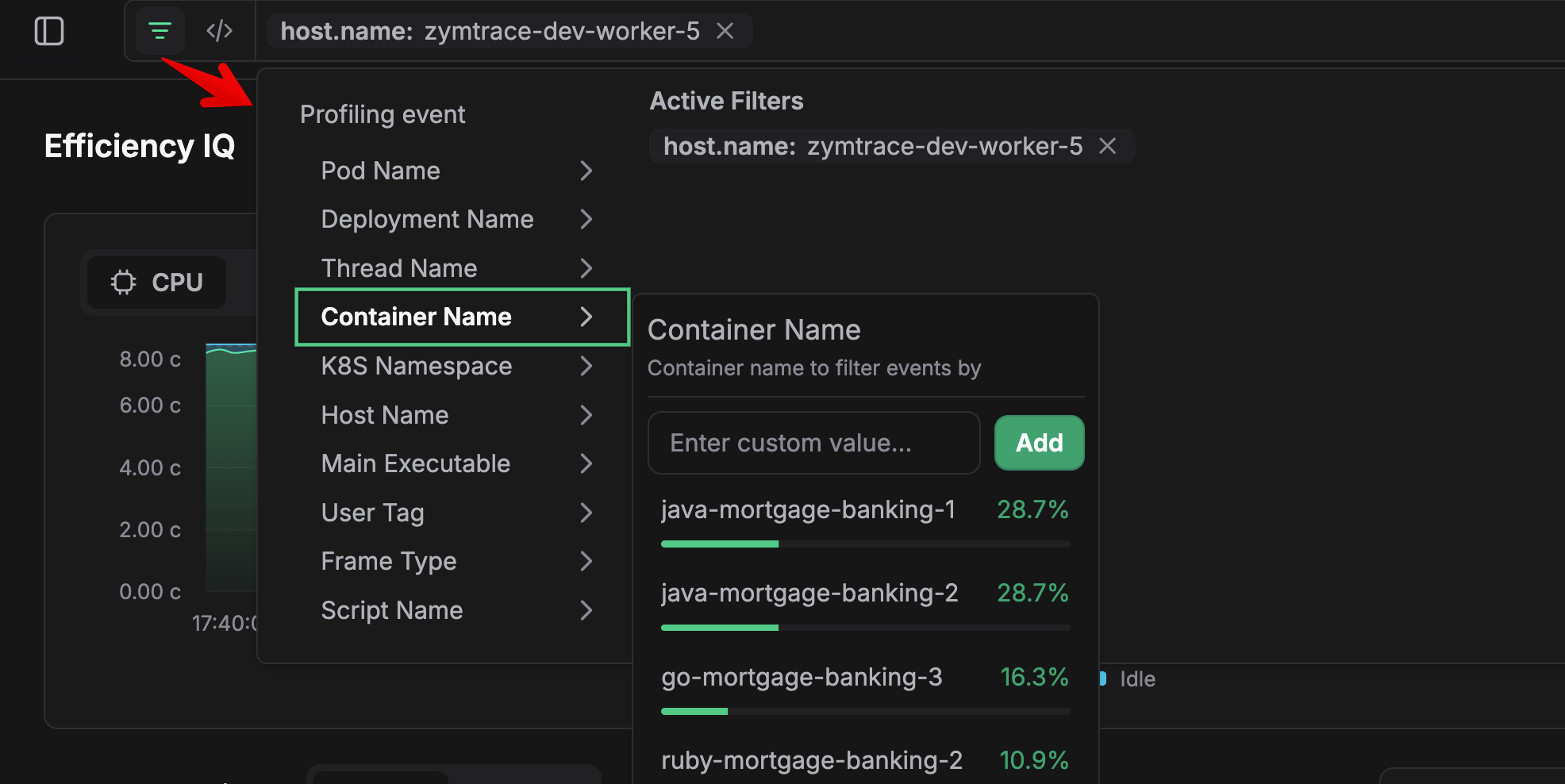
Simply click an entity to apply it as a filter, or enter a custom value to filter by name pattern.
2. Query Mode
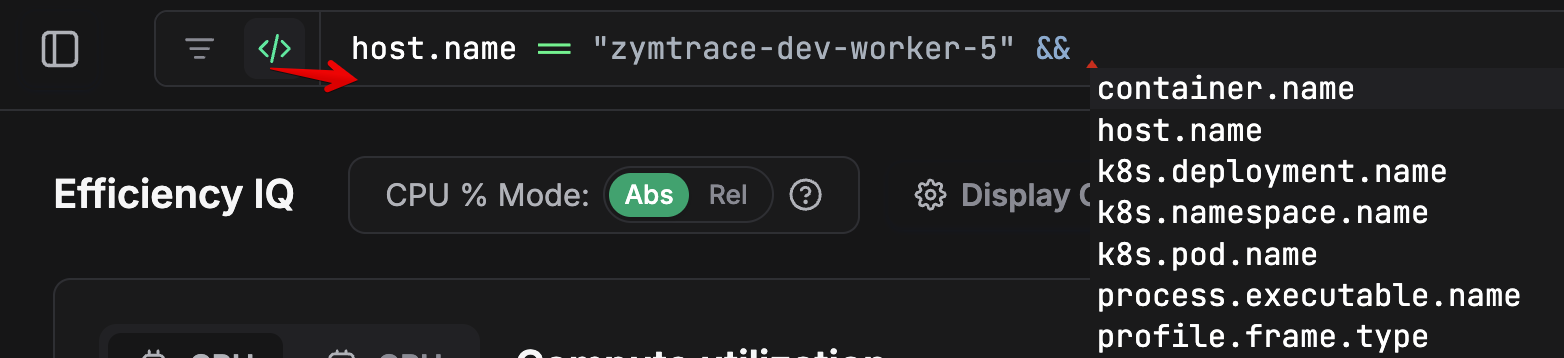
Enter a full query for advanced filtering. Zymtrace supports CEL (Common Expression Language) syntax, and all entities use OTEL resource attributes in the query.
Filter Attributes
| Attribute | Category | Description |
|---|---|---|
k8s.pod.name | Kubernetes | Pod name |
k8s.pod.label | Kubernetes | Kubernetes pod labels as key:value pairs |
k8s.deployment.name | Kubernetes | Deployment name |
k8s.namespace.name | Kubernetes | Kubernetes namespace |
container.name | Kubernetes | Container name |
host.name | Host | Host machine name |
host.arch | Host | Host architecture (e.g. amd64, arm64) |
gpu.name | GPU | GPU model name (e.g. NVIDIA H100 80GB HBM3) |
gpu.uuid | GPU | GPU unique identifier |
process.executable.name | Process | Main executable being profiled |
thread.name | Process | Thread name |
profile.frame.type | Process | Stack frame type (e.g. cuda, jvm, dotnet, kernel, ruby, cpython) |
script.name | Process | Script name for interpreted languages (e.g. user/foo.py). Currently Python only. |
cluster.name | Zymtrace | Cluster name set via -cluster-name on the profiler |
user.tag | Zymtrace | Custom key:value tags set via -tags on the profiler |
job.tag | Zymtrace | User-defined env var used as the custom job tag |
slurm.job.id | SLURM | SLURM job ID |
slurm.job.name | SLURM | SLURM job name |
slurm.job.user | SLURM | Name of the user executing the SLURM job |
Pattern Matching with matches()
Use the matches() function for regex and wildcard pattern matching:
matches(container.name, "vllm.*") // matches containers starting with "vllm"
matches(k8s.pod.name, ".*backend.*") // matches pods containing "backend"
matches(process.executable.name, "python.*") // matches python executables
Example Queries
Example queries:
k8s.namespace.name == "production"
host.name == "node-1" || host.name == "node-2"
process.executable.name == "python3" && profile.frame.type == "python"
container.name == "backend" && k8s.namespace.name != "staging"
For k8s.pod.label, use key access to filter by a specific label:
k8s.pod.label["app"] == "nginx"
Script Name Filtering
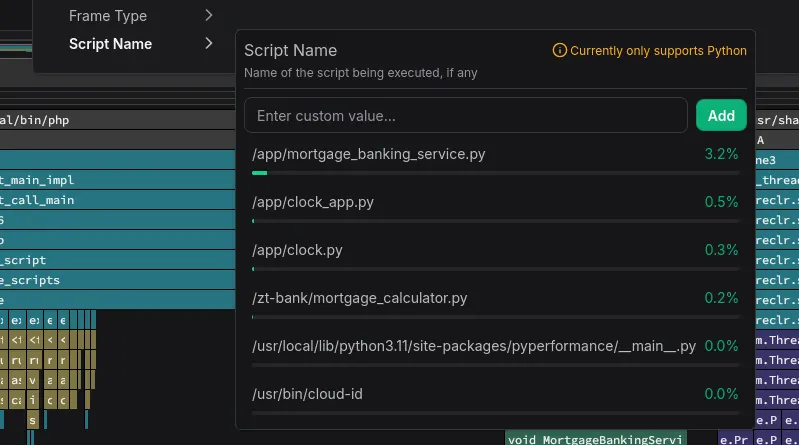
You can also filter by script name in Zymtrace. Python and other script language applications share the same main executable name, making them difficult to differentiate and filter. Multiple Python workloads would all simply show up as python. To solve this, we directly collect the Python script name, enabling you to drill down to the specific application.
This feature is currently limited to Python and we plan to extend support to Java and other high-level languages. Contact us if you need this in other languages.
SLURM Job Filtering
On SLURM clusters, Zymtrace automatically tags every profile and metric with the job's ID, name, and submitting user (slurm.job.id, slurm.job.name, slurm.job.user), letting you slice your entire fleet by SLURM job. This requires SLURM to be configured with cgroup/v2 process tracking. See SLURM-Aware GPU Profiling for how it works and how to enable it.
For example, to focus on all of a user's jobs:
slurm.job.user == "alice"
Or one user's GPU work within a specific job:
slurm.job.id == "1234" && profile.frame.type == "cuda"

Filter Scope
Filters apply globally across, including:
- Efficiency IQ
- Top Functions
- Top Entities
- CPU Profiles
- GPU Profiles
Once applied, filters persist as you navigate between different views, allowing you to maintain focus on specific entities throughout your analysis.